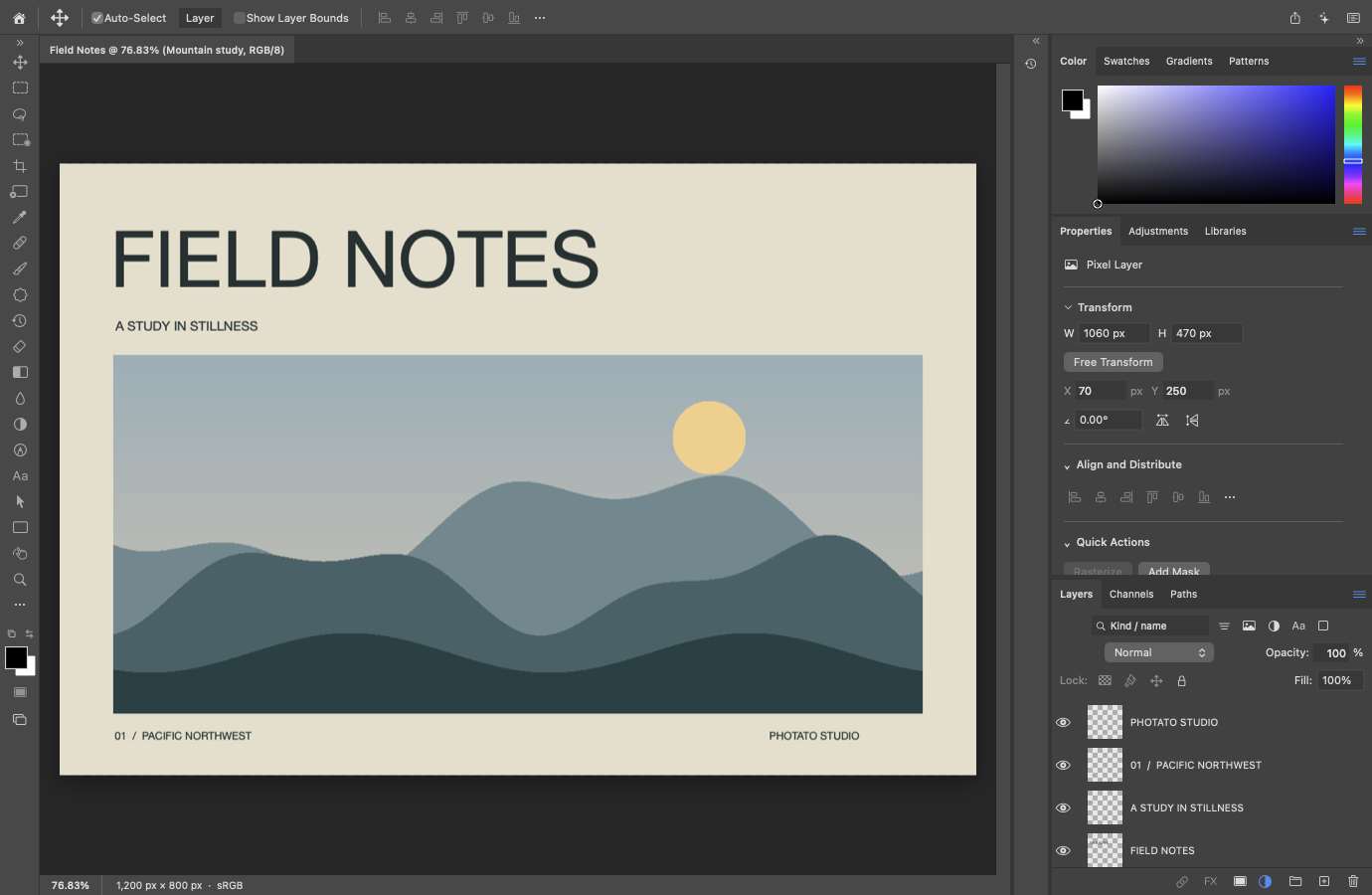
Build in layers
Combine pixel layers, text and shapes. Organize with groups, clipping masks, layer masks and blend modes. Keep edits in a native document with undo and redo.
 Forensic Intelligence
EN — English
Forensic Intelligence
EN — English
A fresh take on image editing for Mac.
Layers, colour, retouching and room to create. Photato brings PhotoCraft’s open-source roots to a native Swift app, with a familiar workspace built for your Mac.
A preview, with an ambitious destination. Photato is being developed toward professional Photoshop workflows. Full PhotoCraft and Photoshop feature parity is still in progress; the app is not yet available on the Mac App Store.
Inside the current preview
A growing set of editing workflows, built with Swift, AppKit and SwiftUI. Photoshop-style menus and factory shortcuts provide a familiar starting point.
Combine pixel layers, text and shapes. Organize with groups, clipping masks, layer masks and blend modes. Keep edits in a native document with undo and redo.
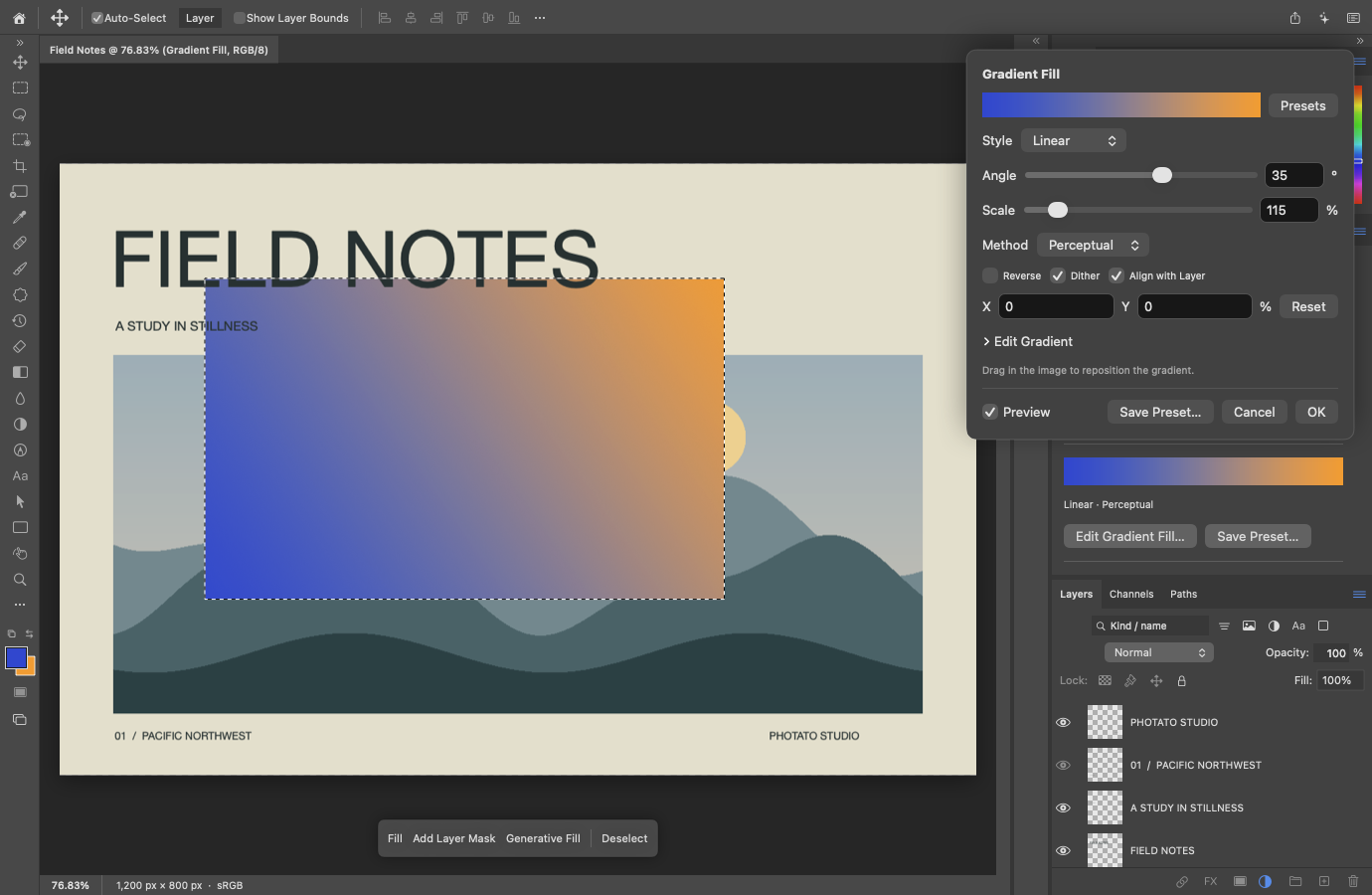
Work with RGB Levels, Curves, Hue/Saturation and Color Balance. Add editable gradient and pattern fills, or use Gradient Map adjustments.
Paint, erase, clone and heal. Use Dodge, Burn, Sponge, Blur, Sharpen and Smudge, with selections and masks to guide your work.
Use document tabs, saved workspaces and rearrangeable panels. Move, align and transform layers, then export images for sharing.
Some contexts and options remain incomplete. Unavailable menu commands stay disabled; their presence does not mean the function is implemented.
Colour, with control
Adjust a gradient’s angle, scale and colour stops in native controls. Retained fill layers keep those choices editable as your composition develops.
Provenance, clearly stated
Photato builds on the work of the PhotoCraft project. That lineage deserves to be visible, along with what this port changes.
Originally developed by the ArtCraft Team and PhotoCraft contributors. PhotoCraft provides the source foundation and many of the algorithms and behaviours adapted for this port.
Visit the original projectAn independent fork and port developed at Forensic Intelligence. The application and editing engine are implemented in Swift, using AppKit, SwiftUI and Apple imaging frameworks. The native app does not embed the Rust runtime or a web interface.
Photato has its own identity and maintainer-supplied icon. The upstream authors retain their credit; this independent port is not endorsed by ArtCraft or Adobe.
The native source and documentation use MIT OR Apache-2.0, at your choice. Original notices are retained; third-party portions keep their own terms. The Photato GitHub repository is private during development and will become public on the same day the software is released.
Both images are unretouched, offscreen captures from the 9 October 2026 development build of Photato 0.2.0 (build 2), not interface mockups. See the developer diary for more recent work. “Field Notes” is original procedural artwork created for this port. The captures contain no user photographs or Adobe artwork.
View the asset provenance recordOptional by design
Keep editing on your Mac. Choose whether to use system AI or connect your own tools to the native engine.
Optional on-device prompt refinement and image creation through Apple’s Image Playground.
AI availability depends on the system, hardware and enabled services. End-to-end model behaviour has not been qualified across all supported configurations.
An optional Photato API lets a browser client send commands to the same Swift engine used by the desktop.
The browser demo is not a complete web editor. Remote hosting and full API coverage remain future work.
Developer diary
Working features, difficult bugs and the choices behind them. We keep a record from the first source audit onward.
Fixing drawing outside the workspace, with a regression reproduction and live checks. Window titles now follow the active document.
Read the entryLens Blur gains depth sources, iris controls and a focus picker, alongside preview, history and automation support.
Read the entrySmart Sharpen and Reduce Noise bring native controls, editable filters and tested document workflows.
Read the entryThe GitHub repository is private during development. It will become public on the same day the software is released.
Development preview 0.2.0, build 2. Features and requirements may change before release.
.photato documents (legacy .pcswift files remain readable). RGB editing at 8, 16 and 32 bits per channel, with operation-specific limits.Not yet. The goal is broad Photoshop functionality in a native Mac app, but Photato is a development preview with significant workflow and compatibility gaps. Familiar menus are not a claim that every command works.
Photato is an independent fork and native Swift port of PhotoCraft, which was originally written in Rust. We credit the ArtCraft Team and PhotoCraft contributors, preserve their license notices, and distinguish the native port’s current capabilities from the upstream project’s.
Core editing runs locally without an account. AI is optional and depends on Apple’s system services. On-device features and Private Cloud Compute have different processing locations and system requirements; cloud generation is not wholly on-device.
A tested subset of Adobe’s published Photoshop API v2 workflows is supported by a separate adapter over the same Swift engine. It is not a drop-in replacement for every Adobe client. Photato’s own API remains available for native document automation.
A public download is not yet available. The GitHub repository is private during development and will become public on the same day the software is released. App Store distribution is planned, with optional in-app purchase tips. There is no web donation checkout. Get in touch with questions or feedback.

Made at Forensic Intelligence
Photato is in development at Forensic Intelligence.
We’d love to hear what you want to create with it.
The repository will become public on release day. Read the provenance and licensing details.