Forensic Intelligence EN — English
In development

Photato

Native image editing for Mac.

A layered image editor built with Swift, AppKit and SwiftUI. Core editing runs on your Mac, with optional AI and automation. Free and open source, with the source code available now.

macOS 14+ · Apple Silicon & Intel · Alpha 0.3.0, source build 524

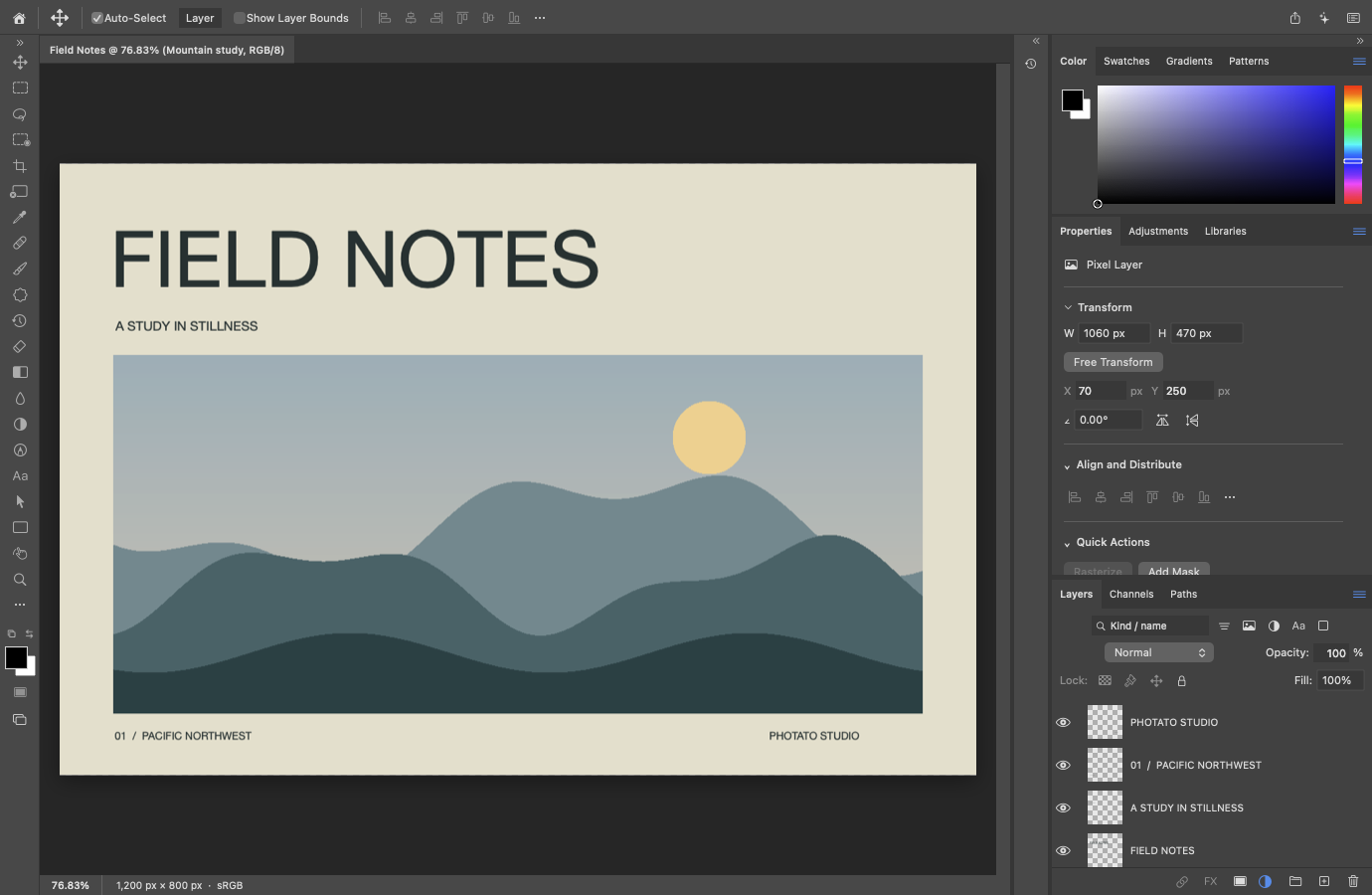
Earlier native interface: Photato 0.2.0, build 2, captured on 9 October 2026 using the original “Field Notes” demo. This image does not show the latest build. About these captures
SwiftNative editing engine and macOS interface.
LayersBuild compositions with groups, masks and adjustments.
Your MacCore editing works locally. AI and automation are optional.
Free & open sourcePublic source on GitHub, with credit to PhotoCraft.

Development alpha. The latest tested source is build 524, recorded on 9 November 2026. Many professional workflows are implemented, but substantial functionality, file fidelity and platform testing remain unfinished. Source code is public; no App Store release is available. Website information checked on 16 November 2026.

Current development build

Editing tools

Layers, selections, painting and colour tools share a native Swift editing engine. Familiar menus and factory shortcuts provide a starting point; implemented workflows and known limits are recorded in the diary.

Build in layers

Combine pixel layers, editable text and shapes. Work with groups, clipping and raster masks, blend modes, Smart Objects and artboards, with content-specific limits. Native documents retain supported editable content and Undo/Redo history.

Shape the colour

Use Levels, Curves, Hue/Saturation, Color Balance and editable fill and adjustment layers. Work with supported RGB, grayscale, CMYK, Lab and other colour-mode workflows; bit-depth and tool support vary.

Refine the details

Paint, erase, clone and heal through selections and masks. Move selection borders with the mouse or arrow keys. Adjustment Brush supports editable Color and vibrance; retained mask-stroke previews improve feedback. Sustained display frame rate remains under test.

Make space to work

Use document tabs, saved workspaces and rearrangeable panels. Move, align and transform layers. Canvas Size retains magnification and pan. Large-document storage is paged, with separate limits for individual operations.

Automate repeated work

Record Actions, process batches and use script-event workflows. The optional Photato API exposes 271 typed commands through the same editing engine and history, with explicit document sharing and operation-specific checks.

Exchange supported files

Use native Photato documents for editable work, plus supported raster, PSD/PSB, PDF and OpenEXR workflows. Interchange is tested for selected content; unsupported layers, metadata and colour combinations remain documented.

Some contexts and options remain incomplete. Unavailable menu commands stay disabled; their presence does not mean the function is implemented.

Colour, with control

Editable gradients

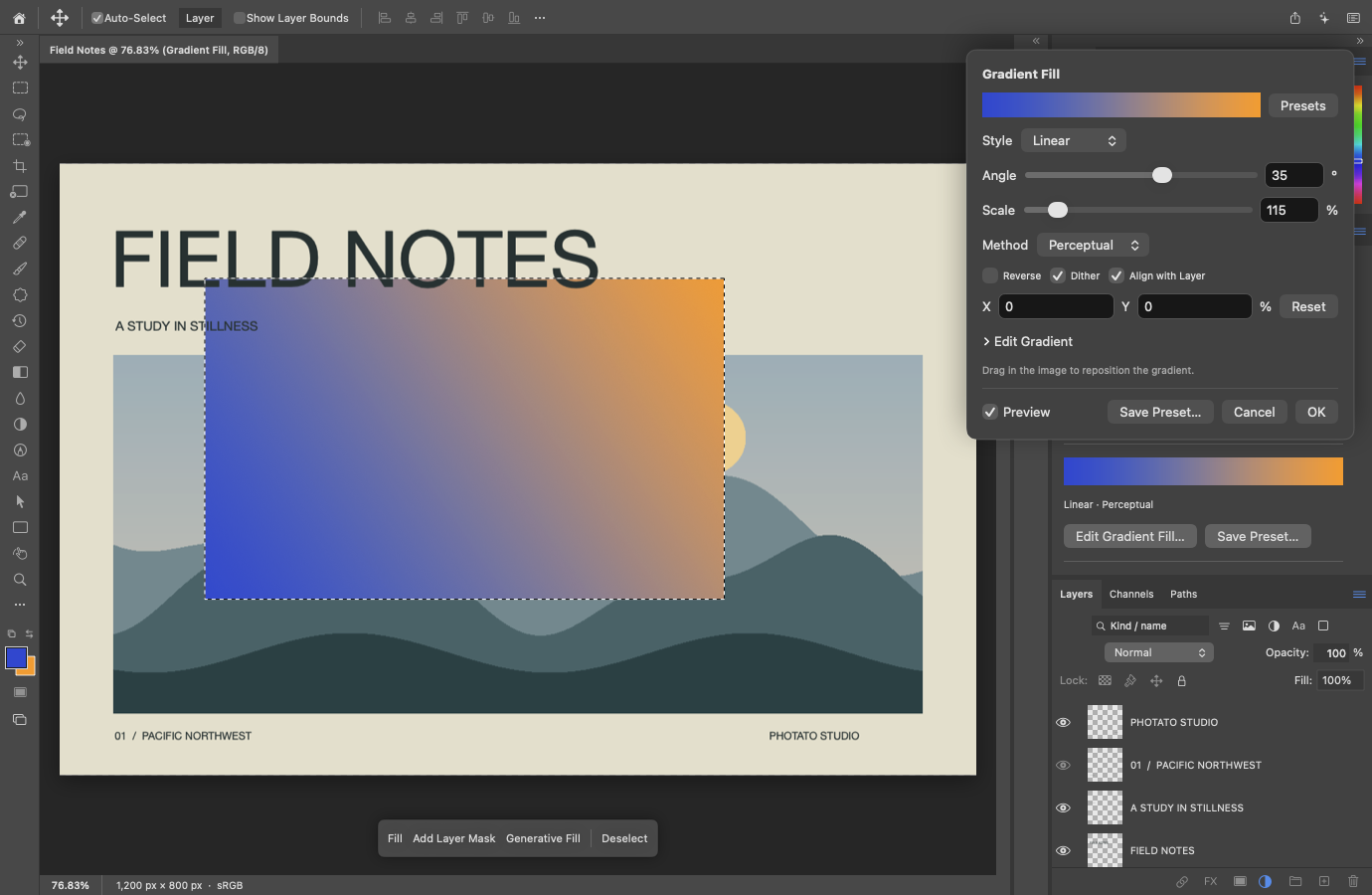
Adjust a gradient’s angle, scale and colour stops in native controls. Retained fill layers keep those choices editable as your composition develops.

Photato displaying an editable blue-to-orange Gradient Fill, with native angle, scale and method controls over the Field Notes composition.
Earlier Gradient Fill capture, 9 October 2026, build 2. This example uses Perceptual interpolation; it is an illustration of that recorded build, not current feature-coverage evidence.

Provenance, clearly stated

Source and credits

Photato builds on the work of the PhotoCraft project. That lineage deserves to be visible, along with what this port changes.

  1. PhotoCraft · the Rust original

    Originally developed by the ArtCraft Team and PhotoCraft contributors. The licensed Rust project supplied the starting point and inspiration for the native port. Its contributors and applicable notices remain credited as Photato’s independent Swift implementation develops.

    Visit the original project
  2. Photato · the native Swift port

    An independent fork and port developed at Forensic Intelligence. The application and editing engine are implemented in Swift, using AppKit, SwiftUI and Apple imaging frameworks. The native app does not embed the Rust runtime or a web interface.

  3. Independent, with clear credit

    Photato has its own identity and maintainer-supplied icon. The upstream authors retain their credit; this independent port is not endorsed by ArtCraft or Adobe.

Open-source licensing

The native source and documentation use MIT OR Apache-2.0, at your choice. Original notices are retained; third-party portions keep their own terms. The Photato GitHub repository is public. Browse the source, tests and development records on GitHub.

What you’re looking at

Both images are unretouched, offscreen captures from the 9 October 2026 development build of Photato 0.2.0 (build 2), not interface mockups. See the developer diary for more recent work. “Field Notes” is original procedural artwork created for this port. The captures contain no user photographs or Adobe artwork.

View the asset provenance record

Optional by design

Optional AI and automation

Keep editing on your Mac. Choose whether to use system AI or connect your own tools to the native engine.

System integration

Optional Apple AI

Optional on-device prompt refinement and image creation through Apple’s Image Playground.

  • On-device integration requires a supported Apple Silicon Mac and macOS 26 or later.
  • The app includes a Private Cloud Compute path for macOS 27 or later, subject to system availability. Cloud generation involves off-device processing.
  • Generated-image alternatives can be retained in native documents and selected or deleted with Undo/Redo. This does not establish Generative Fill, Generative Expand or Adobe Firefly model equivalence.

AI availability depends on the system, hardware and enabled services. End-to-end model behaviour has not been qualified across all supported configurations.

Automation preview

Two API interfaces

An optional Photato API lets a browser client send commands to the same Swift engine used by the desktop.

  • 271 typed commands cover supported native document workflows, filters, layers, selections, history and more, with operation-specific limits.
  • Off at every launch; authenticated loopback access with explicit document sharing.
  • A separate Adobe Photoshop API v2 adapter supports a tested subset of published workflows. Full compatibility remains in development.

The browser demo is not a complete web editor. Adobe-compatible coverage is bounded; support for the Photato API does not imply support for every Adobe endpoint.

Tech specs

Latest tested source: alpha 0.3.0, build 524, recorded 9 November 2026. Selected checks pass in Debug, optimized Apple Silicon and translated Intel. Full platform qualification remains open.

Platform
macOS 14 or later. Universal native application for Apple Silicon and Intel. Optional AI has additional requirements above.
Native foundation
Swift, AppKit, SwiftUI, CoreGraphics, CoreText and ImageIO. No Electron or embedded web editor.
Documents
Native .photato documents; legacy .pcswift remains readable. RGB supports 8, 16 and 32 bits per channel. Other colour modes and tools have separate bit-depth, storage and operation limits.
Image export
Supported PNG, JPEG, TIFF, PDF and OpenEXR workflows, plus layered PSD/PSB interchange for supported content. Format, colour-mode and metadata limits vary.
PSD compatibility
Supported RGB pixel layers, groups, clipping and raster masks, plus selected editable fills and adjustments. Smart Objects, rich layers and PSD/PSB interchange have tested, bounded support. Full file-format fidelity remains in development.
Still ahead
Complete professional workflows, broader colour and interchange fidelity, generative editing, full API coverage, sustained editing performance and supported-platform qualification.
Availability & support
The source repository is public under MIT OR Apache-2.0, with separate third-party terms retained. Photato is completely free, with no purchases, tips or subscriptions. Mac App Store distribution is planned; no public App Store release is available.

Questions

Is Photato ready for production work?

Photato is an alpha with significant workflow, compatibility and testing gaps. Keep original files and separate backups when evaluating it. A passing set of regression tests does not establish full functionality or file-format fidelity; the diary records the qualified scope and remaining work.

Is this the same application as PhotoCraft?

Photato is an independent fork and native Swift port of PhotoCraft, which was originally written in Rust. We credit the ArtCraft Team and PhotoCraft contributors, preserve their license notices, and distinguish the native port’s current capabilities from the upstream project’s.

Do I need AI or an account to edit?

Core editing runs locally without an account. AI is optional and depends on Apple’s system services. On-device features and Private Cloud Compute have different processing locations and system requirements; cloud generation is not wholly on-device.

Can I use an existing Photoshop API client?

A tested subset of Adobe’s published Photoshop API v2 workflows is supported by a separate adapter over the same Swift engine. It is not a drop-in replacement for every Adobe client. Photato’s own API remains available for native document automation.

Will Photato be free and open source?

Yes. The source is available now under MIT OR Apache-2.0, with third-party terms preserved. Photato is completely free, with no purchases, tips, subscriptions or paid feature unlocks. No GitHub release or App Store download has been published. The GitHub repository is public. Browse the source, tests and development records on GitHub. Free App Store distribution is planned. Get in touch with questions or feedback.

Photato application icon

Made at Forensic Intelligence

Photato is free and open source

Photato is in development at Forensic Intelligence.
We’d love to hear what you want to create with it.

Talk to us about Photato

The repository is public now. Read the provenance and licensing details.